AI workflow automation
AI workflow automation: your routine, run by rules and AI
Every deal that moves, every form that arrives and every invoice that falls due sets off the same small chores: the email, the task, the document, the message to the team. Our AI workflow automation connects your CRM, mailbox, calendar, payments and chats so those steps happen on their own: by rules where the process is clear, by an AI agent where a judgement call is needed.
Move a deal. Watch the robot work.
Drag a card to the next stage: the welcome email goes out, the task appears, the proposal is generated, the invoice is raised. That is one workflow. Yours will have your steps.
It’s live — try it right here, nothing saved.
- Nothing yet. Move a card forward — every step fires real-world actions.
An automated workflow.
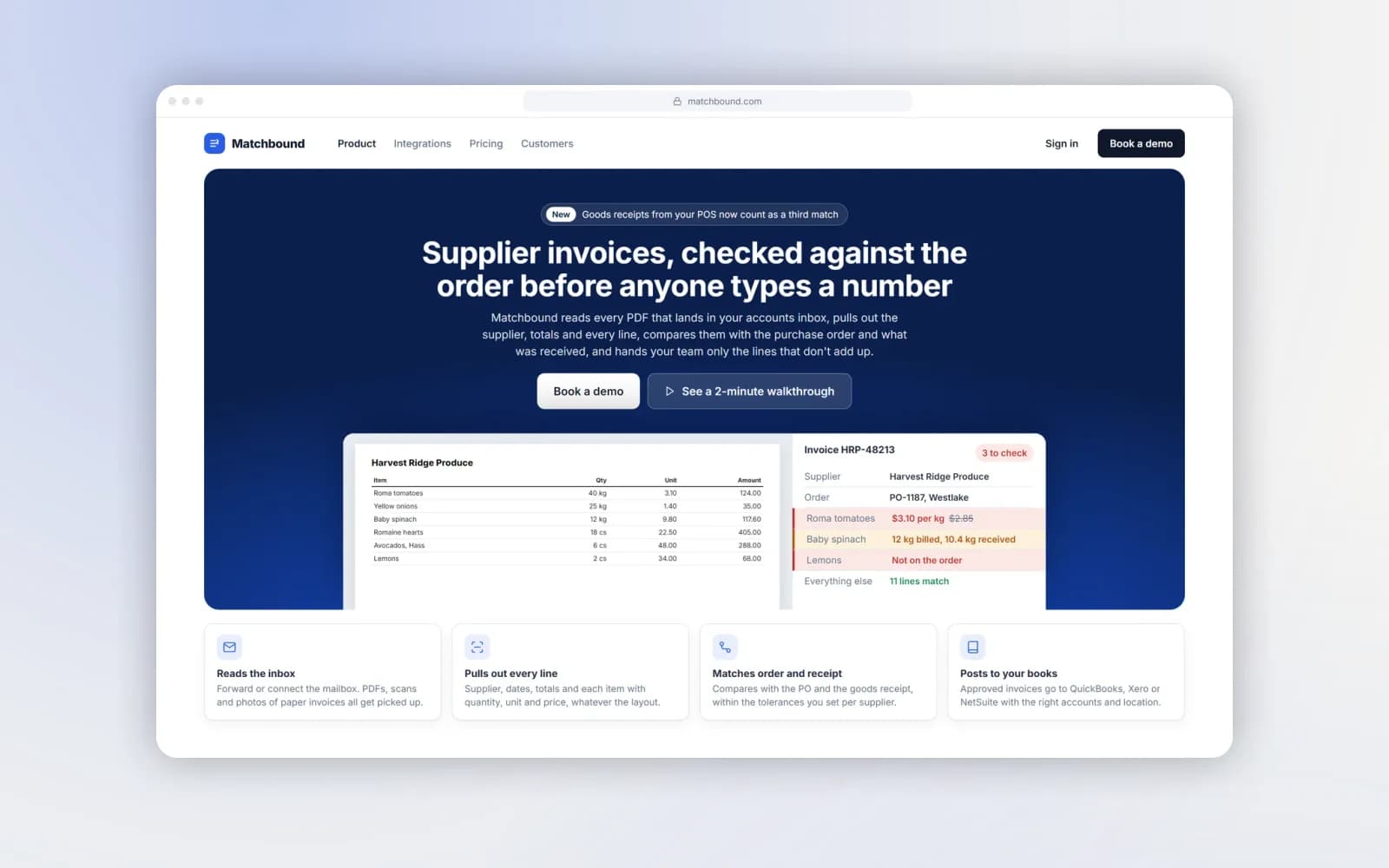
Matchbound: supplier invoices read by AI, matched against the order and the delivery, posted to the books with a person only where the numbers disagree.
What AI workflow automation covers
We start where the repetition is. For most small teams that is one of four places.
Sales pipeline and follow-ups
When a lead arrives or a deal changes stage, the CRM record is created or updated, the right email goes out and a task lands with the right person. Nothing waits on someone remembering. Reminders fire on schedule, and stale deals are flagged before they go cold.
Documents, invoices and payments
Proposals, contracts and invoices are generated from templates with the deal’s data, sent for signature or payment, and their status is written back. Paid, overdue and disputed cases each trigger their own next step.
Incoming requests, read and routed by AI
Emails, form submissions and chat messages arrive in every format. An AI step reads each one, works out what it is (an order, a question, a complaint, a supplier invoice), pulls out the details and sends it to the right place: a CRM deal, a support ticket, the accounts inbox. Anything unclear goes to a person.
Hand-offs between your systems
Orders, bookings and requests move between the tools you already use (CRM, accounting, calendar, messengers, spreadsheets) without retyping. Where a decision needs reading and judgement, an AI agent takes it and passes the exception to a person.
Rules or AI: which steps need a model
Most of a workflow is predictable. “When a deal moves to Won, send the invoice” doesn’t need AI; it needs a reliable trigger. Using a language model there only adds cost and a small chance of error.
AI earns its place in the steps where a person currently has to read and decide:
Deal moves to a new stage → send the email, create the task
- Rules
- AI
- —
Invoice is overdue by 7 days → send a reminder
- Rules
- AI
- —
An email arrives → is it an order, a question or a complaint?
- Rules
- —
- AI
A supplier invoice arrives as a PDF or photo → read the lines, match against the order
- Rules
- —
- AI
A customer writes in free text → collect name, date, service and book it
- Rules
- —
- AI
A reply to a standard question → draft it for approval
- Rules
- —
- AI
Payment received → mark as paid, notify the team
- Rules
- AI
- —
Most workflows end up mostly rules with one or two AI steps. The scope document says which is which, so you know where a model is involved and what it’s allowed to do. If a step needs judgement but the stakes are high, the AI prepares the decision and a person approves it.
If you are still working out which of your processes to automate at all, start with our guide on what to automate first.
n8n, workflow platforms or custom code
We build on the tools you already have (HubSpot, Pipedrive, Notion, Google Workspace, Stripe, Telegram, WhatsApp and the like) and on workflow platforms such as n8n where they fit. Custom code comes in only where a platform would be the more expensive route.
When an n8n automation agency is the right call
n8n is a good base when a workflow connects several services with usable APIs, needs a few branches and should stay editable by your team. A visual workflow is easier to hand over than a code repository, and your team can change a step without calling a developer. We use n8n and similar platforms for exactly those cases.
When custom code is cheaper
A platform stops paying off when the workflow needs heavy data processing, its own interface for your team (a review screen, a dashboard), strict performance or a system without an API. Then we write the integration in code (Python, TypeScript) and deploy it in your infrastructure. Matchbound, below, is that kind of project: invoice matching with its own review screens.
Either way, the workflows run in your accounts and you own them.
Doing it yourself or hiring an AI automation agency
Plenty of teams start automating on their own, and for simple two-step flows that is the right choice. An AI automation agency makes sense when:
- the workflow touches three or more systems and a failure in one breaks the rest;
- a step needs AI, and someone has to decide what the model may do, test it on real cases and set up a hand-off to a person;
- you need logging, alerts and a way to pause, not just a flow that works on a good day;
- nobody in the team has time to maintain it, and “the person who built the Zap” is about to leave.
What to expect from any agency, including us: a map of the process before building, a written scope with a fixed price, the first workflow live before the second one is sold, and documentation of every trigger, step and integration at hand-over.
Not sure which process to start with? Begin with an AI consulting session.
How to pick the first workflow
The first automation should pay for itself quickly and be easy to check. A workflow is a good candidate when most of these are true:
- It happens every day or every week, not once a quarter.
- The trigger is clear: a form arrives, a deal moves, an invoice lands in the mailbox.
- The steps are the same most of the time, and the exceptions can be listed.
- It touches two or more tools, and someone copies data between them by hand.
- Mistakes are visible and costly: a missed follow-up, a wrong price, a late invoice.
- Someone owns it and can tell us how it actually works, not how it should work.
Bad first candidates: a process that changes every month, one nobody can describe end to end, or one where every case is an exception. Those need to be settled on paper before any automation, AI or not.
One workflow at a time, measured
Map the process as it happens today
The trigger, the steps, the people, the systems and the exceptions. Real examples help most.
Agree what runs by rules, what an AI agent handles and where a person stays in the loop
Scope, price and delivery date are fixed in writing.
Build the first workflow end to end
With logging you can read and a way to stop it.
Run it on real cases for a few weeks
A person reviews the output. Review is relaxed only when the results warrant it.
Hand over and extend
You get documentation of every trigger, step and integration. Only then do we scope the next process. That is how the budget stays practical and the automation stays trusted.
A first workflow can be live from around three weeks once access to the systems and a few real examples of the process are ready.
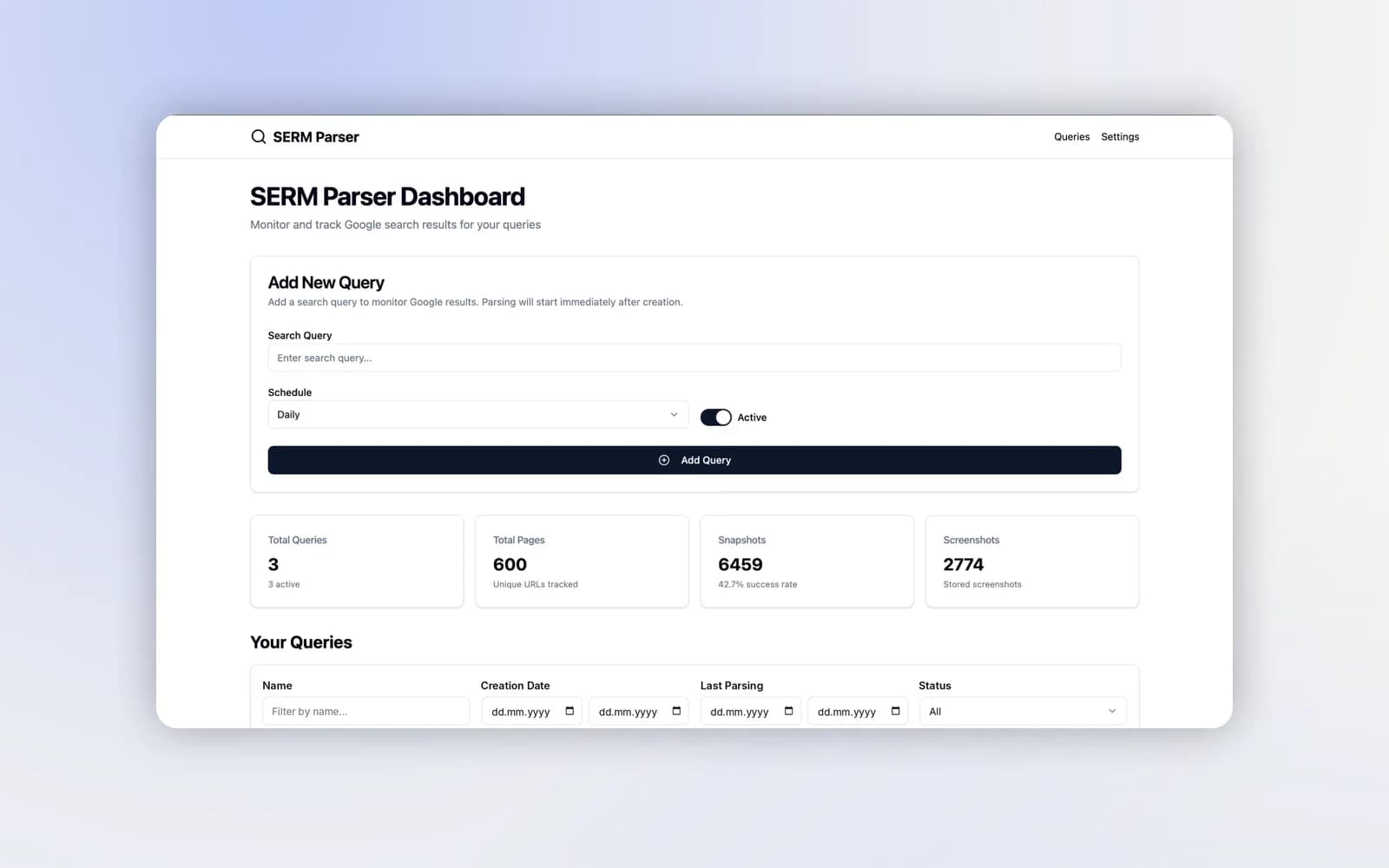
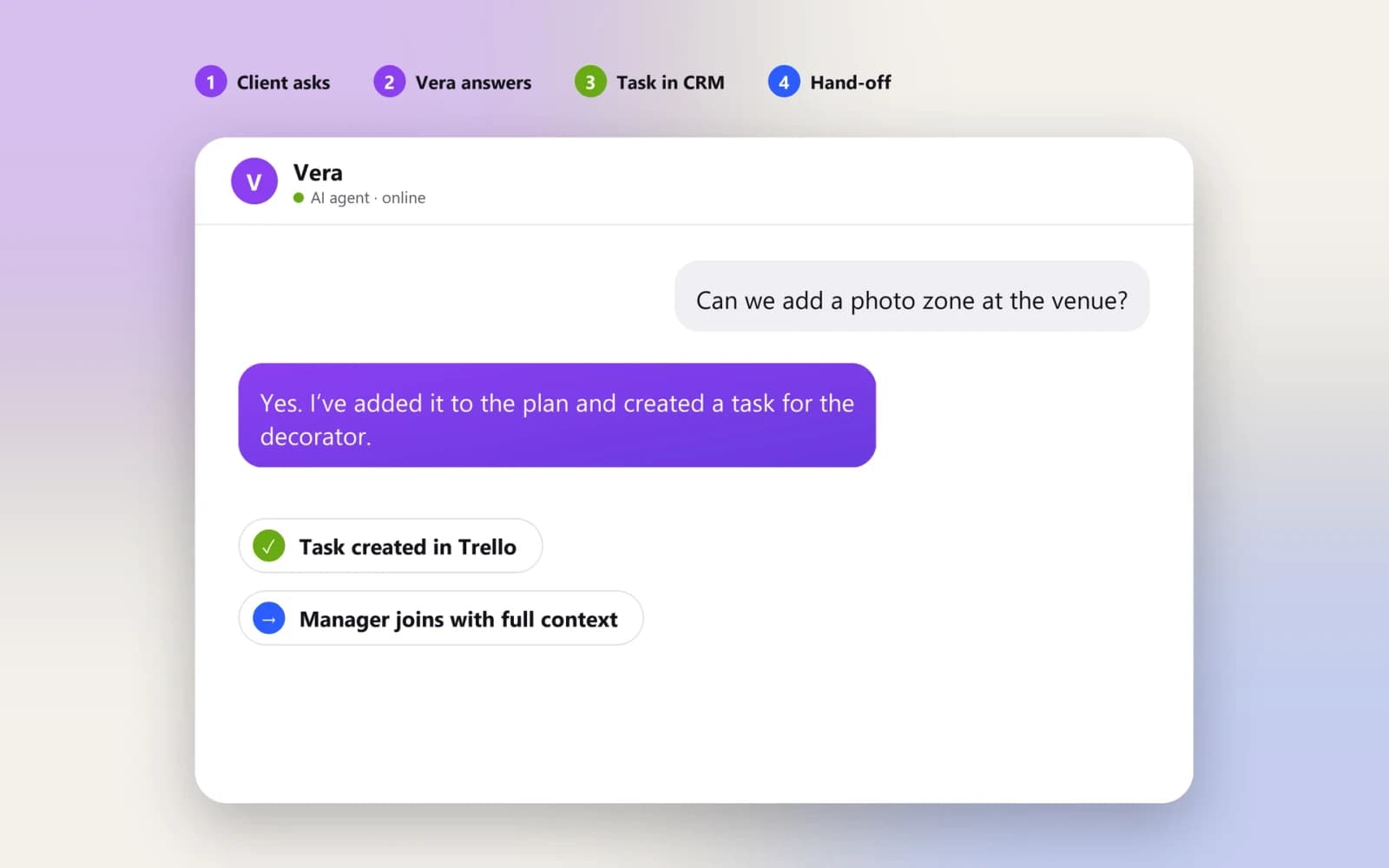
Examples: invoices matched by AI, complaints filed automatically, an agent that handles requests
Three workflows running in production, each with a person exactly where one is needed.
AI workflow automation cost and timing
The estimate depends on the number of systems and whether their APIs are usable, how much of the process needs an AI agent rather than rules, and how many exceptions have to be handled and who reviews them.
Each further workflow is scoped and priced on its own. A first workflow can be live from around three weeks once access and examples are ready.
Subscription costs of third-party platforms (CRM, n8n, messaging, AI model usage) are listed separately, so you see the running cost before you commit.
Six-month warranty. Coverage and ongoing support are set out in your project agreement.
The stack we build with.
Fair questions, straight answers.
Tell us which routine to remove first
Describe one process that repeats every day: who starts it, which tools it touches and where it stalls. We’ll map it, mark what can run on its own and estimate the work.