Restaurant app development
A restaurant app your guests order from directly
Marketplaces take a share of every order and keep the customer. Your own app keeps both. The guest sees your menu, picks pickup or delivery, pays in two taps and earns a stamp on your loyalty card. The order prints at the counter or lands in your POS exactly as if the cashier had typed it.
A loyalty card that lives in the app.
Tap the QR, watch the stamp land and the reward unlock — the loop your guests repeat every morning.
It’s live — try it right here, nothing saved.
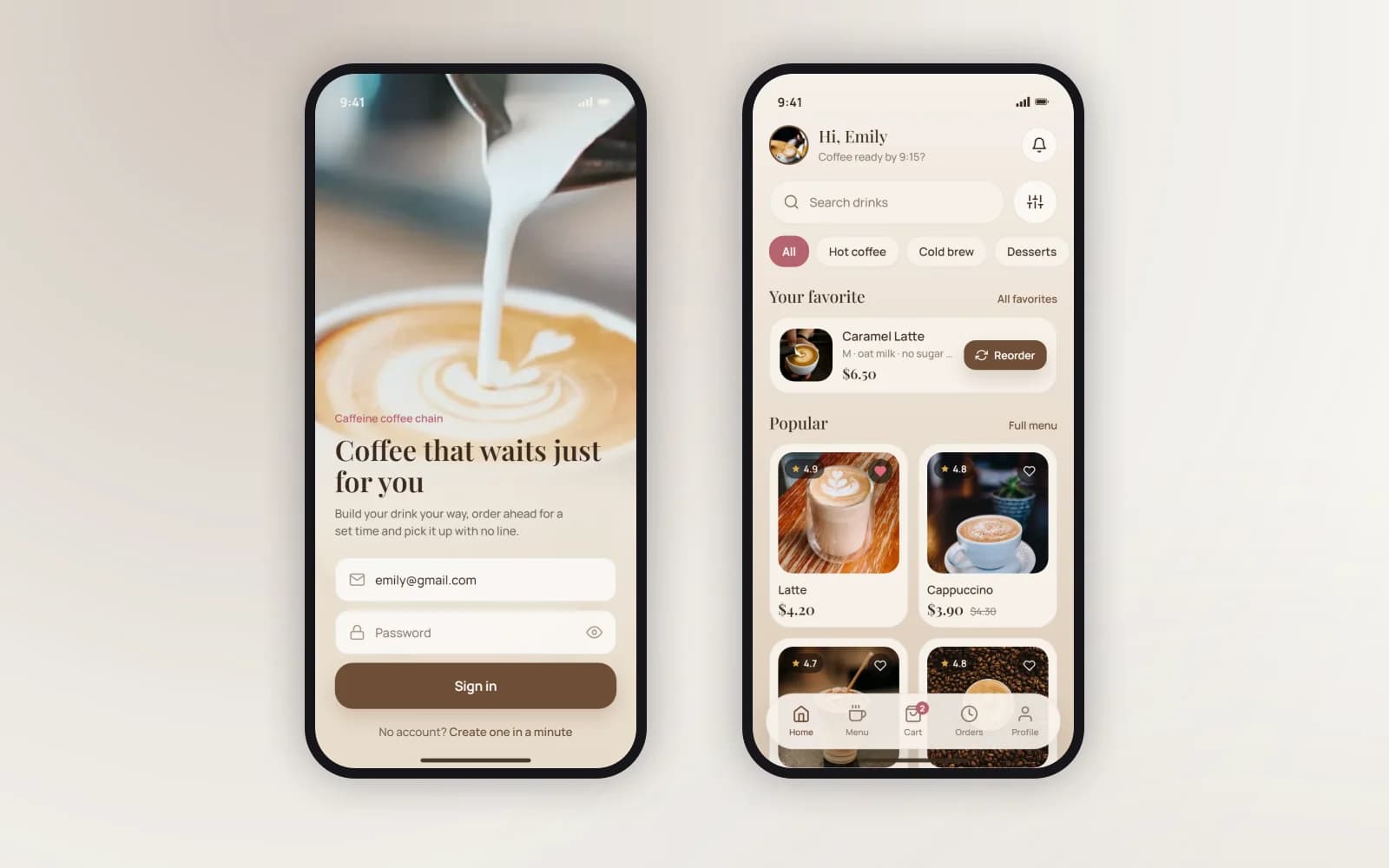
A coffee-shop app.
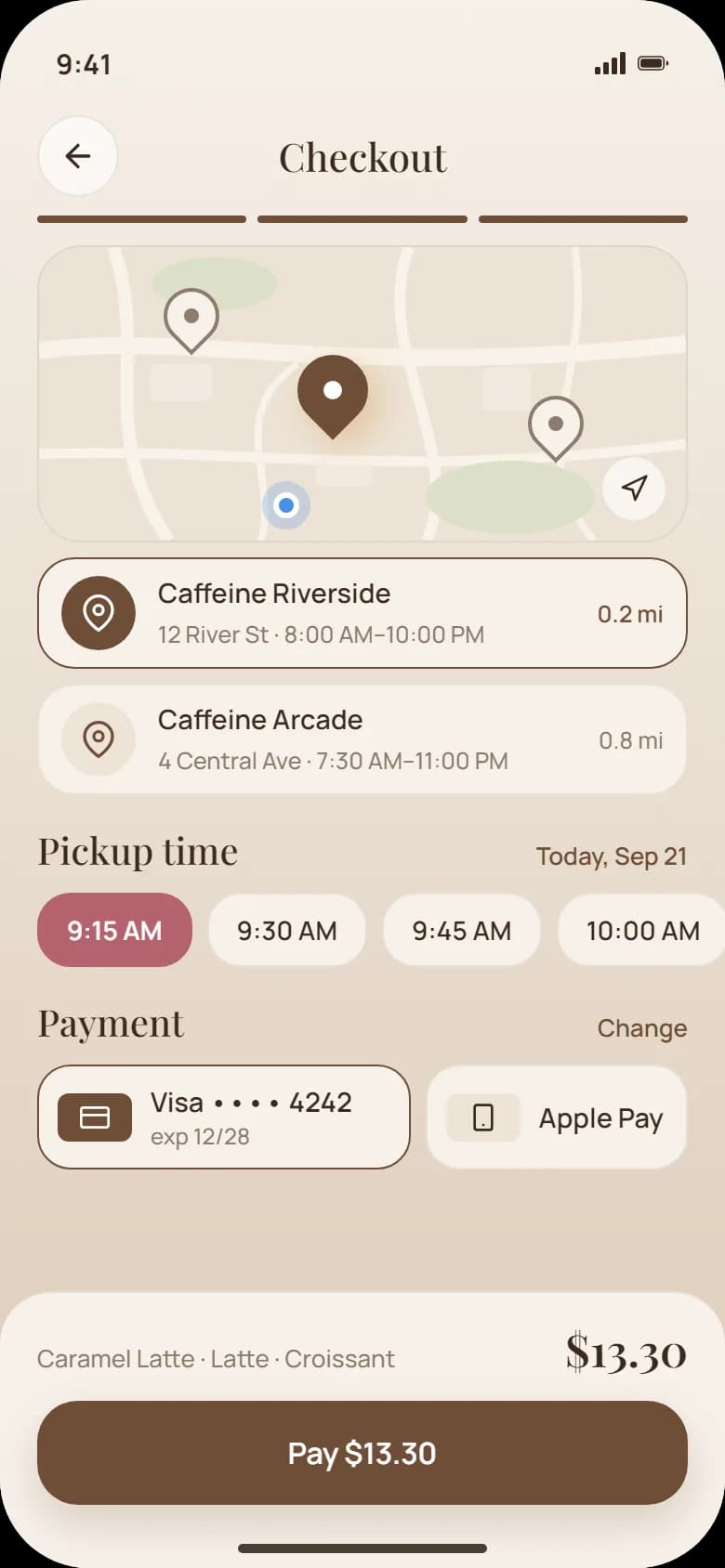
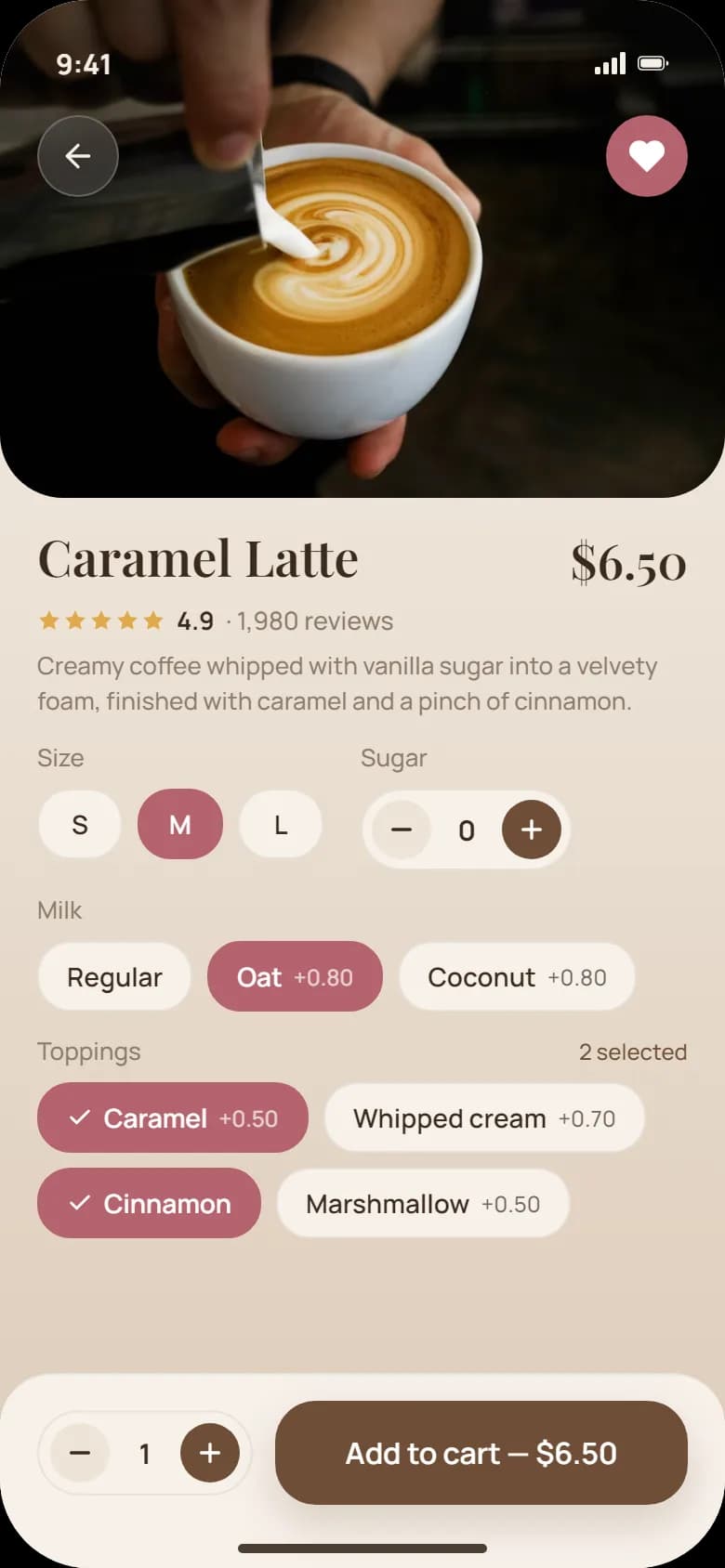
Caffeine: sign-in, a menu with favourites, a product with options, checkout with a pickup time and a stamp card — a finished ordering app.
Who a restaurant app is for
Cafés and coffee chains
With regulars who order the same drink at the same time and would rather skip the queue.
Restaurants
That take pickup and delivery orders and pay marketplace commission on guests who already know them.
Dark kitchens
That live on delivery and need their own channel next to the aggregators.
Chains with several venues
Where each venue has its own menu, hours and pickup times.
If most of your orders come from people who have never heard of you, keep the marketplaces — they bring reach. The app is for the guests who come back.
What the restaurant app does
Menu, ordering and pickup
Your menu with photos, options and allergens; a cart; pickup at a chosen time. Out-of-stock items disappear the moment the kitchen marks them, and the guest pays with Apple Pay, Google Pay or a card. Regulars reorder their usual in one tap.
Loyalty card and push offers
Stamps or points on every order, a reward that unlocks itself, a birthday offer, a first-order bonus and a push when the morning rush is over. Your programme’s rules, in the app, with the numbers in your admin — not on a marketplace’s.
Orders in your POS, not on a tablet
Every order lands in the POS or kitchen printer your team already works with, with the same item codes and the same receipt. Where the POS has an API we connect to it; where it has none, the app’s own order screen and printer do the job.
Admin for the team
A menu admin to change items, prices and stock, an order screen for the counter, and the loyalty numbers in one place.
Food delivery app development: your couriers or a provider
Delivery is where a restaurant app gets more complex, so we plan it as its own step. Most venues start with pickup and add delivery once ordering is running. The app is built so delivery is a setting, not a rebuild.
What we set up for delivery:
- Delivery zones and minimums — where you deliver and from what order value.
- Delivery slots you control — the kitchen decides how many orders it can take per slot.
- Address and order status for the guest, from “accepted” to “on the way”.
- Your own couriers or a delivery provider — we connect the option you use.
- The same POS flow — a delivery order reaches the kitchen the same way as a pickup order.
Food delivery app development for a dark kitchen or a chain follows the same path: pickup and payment first, then delivery, then several venues. Each phase gets its own scope and estimate, so you only pay for what you run.
Your menu, your rules, your POS
We start from how you sell today: the menu and its options, pickup times, delivery zones and minimums, how the loyalty card works, what a birthday or a first order earns. Those rules become the app’s rules — it takes exactly the orders your counter would.
Where you run a POS with an API (common café and restaurant systems, Square, Lightspeed and the like), the app writes orders into it and reads the menu and stock from it. Where there is none, we build the order screen, the menu admin and the printer connection.
Payments go through Stripe or your provider. Personal data is handled under GDPR, with EU hosting available.
Your own app or marketplaces like Uber Eats and Wolt?
You do not have to choose one. Most venues keep both: marketplaces for new guests, the app for regulars.
Who pays commission
- Marketplace
- You, on every order
- Your own restaurant app
- No marketplace commission on app orders
Guest contact and order history
- Marketplace
- Stays with the marketplace
- Your own restaurant app
- Yours
Loyalty programme
- Marketplace
- The marketplace’s rules
- Your own restaurant app
- Your stamps, points and offers
Brand
- Marketplace
- One tile among many
- Your own restaurant app
- Your app on the guest’s phone
Reach to new guests
- Marketplace
- Strong
- Your own restaurant app
- Grows through your regulars and your venue
Cost to start
- Marketplace
- Sign-up
- Your own restaurant app
- A project price fixed before the build, running costs listed upfront
The app pays off on repeat orders. If you want to work out your own numbers first, our guide how to build an app for your restaurant walks through the options.
Restaurant app cost and timing
The estimate depends on the menu’s complexity and options, on delivery and how it is run, on the number of venues and on the POS the app has to talk to. Table ordering and multi-venue are scoped as their own phases.
A first release can be in the stores from around eight weeks once your menu, rules and POS access are ready. Store fees, payment and push provider subscriptions are listed separately.
Six-month warranty. Coverage and ongoing support are set out in your project agreement.
What the starting price includes
- Your menu with options and allergens, pickup at a chosen time
- Payment with Apple Pay, Google Pay or a card
- A loyalty card: stamps or points and a reward
- Orders into your POS or kitchen printer
- Menu admin and an order screen for the counter
- iOS and Android apps for one venue
From first message to launch
Tell us what needs to work
Send your menu, how you take orders today and the POS you use. A short message is enough to start.
Agree the scope and quote
We define the first release, responsibilities, price and delivery date before development begins.
Review the build
You see the agreed screens and working flows as the project develops. Changes are assessed before extra work starts.
Launch and hand over
We prepare the release, test ordering, payment and the loyalty card end to end, help with store submission and hand over the project as set out in your agreement.
Project examples: a coffee-shop app and a beverage chain’s loyalty app
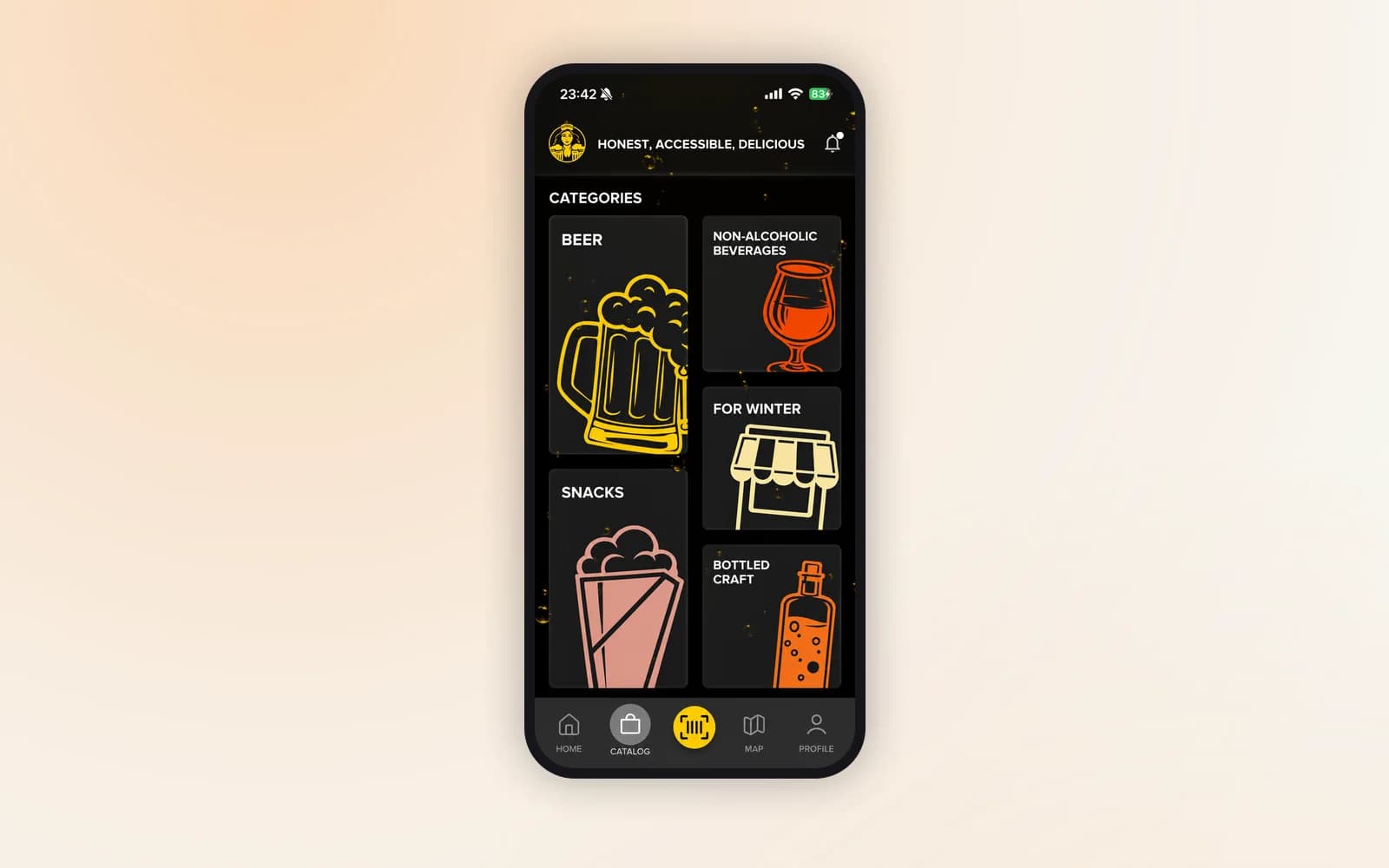
Caffeine is a branded ordering app for a coffee chain with a morning queue. The beverage retail chain’s app was rewritten from scratch around a loyalty programme. Both are ordering and loyalty the way guests expect them.
The stack we build with.
Fair questions, straight answers.
Tell us about your menu and your regulars
Send your menu, how you take orders today, the POS you use and how your loyalty card works. We’ll map the ordering flow, name the integrations and estimate the work.