Online booking system
An online booking system your clients use instead of calling
Clients want to book at 10 pm, not call at 10 am. A booking system puts your real availability on your website and in chat: pick a service, a person and a slot, confirm — and the booking lands in the one schedule your team works from, with a reminder that cuts no-shows and a cancellation rule you set.
- Telegram
A booking flow.
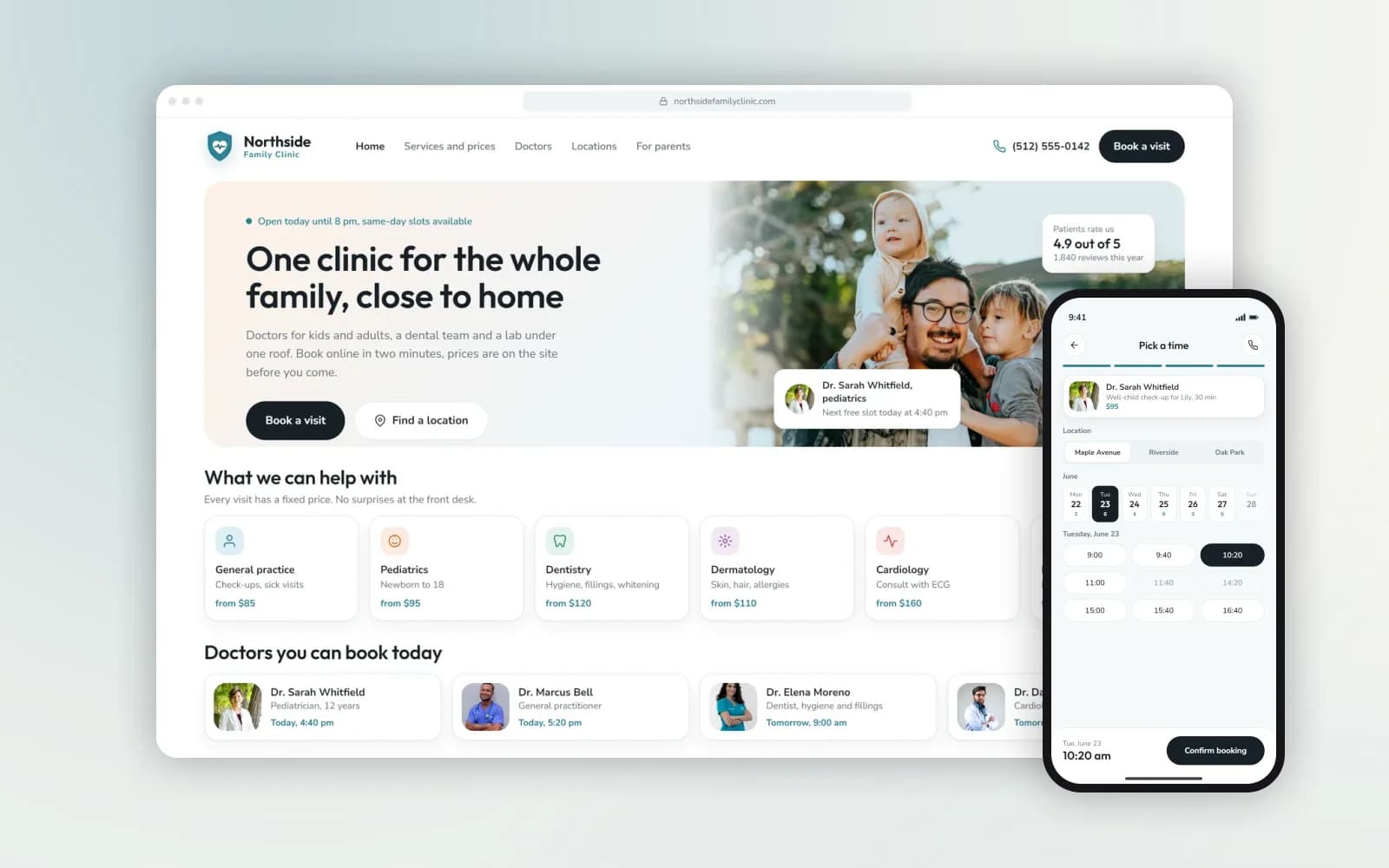
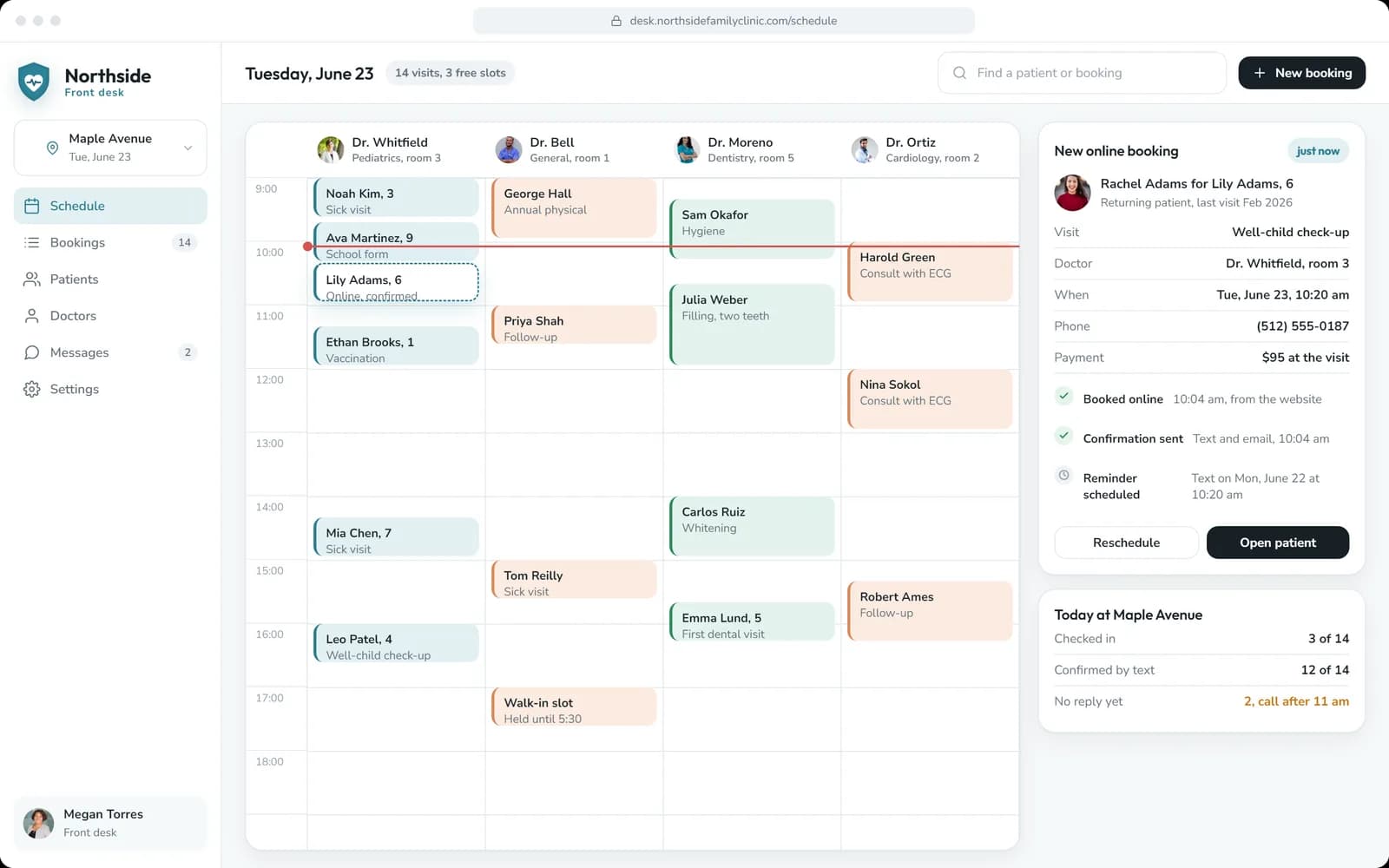
Northside Family Clinic: doctors available today, services with prices, a three-step booking and a front-desk admin with the day’s schedule and a waiting list.
Who it’s for
An online booking system pays off wherever the day is made of appointments and the phone is the bottleneck:
- Clinics and practices — doctors, dentists, physiotherapists: several specialists, different visit lengths, patients who book for a child or a parent.
- Studios and classes — Pilates, yoga, fitness: group classes with a capacity, class packs, a waiting list for full sessions.
- Salons and beauty — services with different durations, a master per client, deposits against no-shows.
- Service businesses — consultations, repairs, viewings, rentals: a slot, an address and a reminder.
If each booking follows your own rules — who can do what, what needs a gap, what needs a deposit — that is exactly what the system is built around.
What the booking system does
Booking on your site and in chat
Service, person, location, slot — the same flow on your website, in the WhatsApp or Telegram bot and, if you want, in a mini app. Availability is real: what is booked disappears, what opens up is offered.
Reminders, rescheduling, waiting list
A confirmation at once, a reminder the day before and a nudge two hours ahead, on the channel the client used. Rescheduling and cancellation follow your rules; a waiting list fills a slot the moment someone cancels.
One schedule for your team
Every booking lands in the calendar or practice software your team already works from — or in an admin we build, with the day by person, arrivals, no-shows and payments. Nobody keeps a second diary by hand.
Appointment booking bot for WhatsApp and Telegram
Many clients never open your website: they already write to you in a messenger. An appointment booking bot lets them book where they are.
- The same availability. The bot reads the same schedule as the website, so a slot cannot be booked twice.
- A short conversation, not a form. The bot asks for the service, offers the nearest free slots, confirms the time and sends the address.
- Reminders in the same chat. Confirmation, the reminder the day before and the nudge two hours ahead arrive where the client booked, with a one-tap way to reschedule or cancel.
- A handover to a person. When a question is not about booking, the conversation goes to your team with the history attached.
The bot can be part of the first release or added later. If WhatsApp is your main channel for more than booking — answering questions, sending offers, taking orders — see WhatsApp business automation. For other chatbot work, see chatbot development.
Your services, your rules, your systems
We start from how you book today: the services, who provides them, how long each takes, what can be booked back to back and what needs a gap, deposits, cancellation terms. Those rules become the system’s rules — it books exactly what your front desk would.
Where you already run a calendar or practice software with an API (Google or Microsoft calendars, common practice and salon systems), the booking system writes into it and reads availability from it. Where there is none, we build the schedule and the admin.
Payments and deposits, if you take them, go through Stripe or your provider; personal data is handled under GDPR, with EU hosting available. The first release covers the booking flow, reminders and one schedule; the waiting list, memberships or multi-location come as phases.
Booking software or your own online booking system?
There are good ready-made booking apps, and for some businesses they are the right answer. We would rather say so than sell a build you do not need.
Start
- Ready-made booking software
- Sign up and configure in a day
- Your own booking system
- First release in weeks, after the scope is agreed
Cost
- Ready-made booking software
- A monthly fee per staff member or location, often plus paid add-ons
- Your own booking system
- A one-off build at a fixed price, then hosting and messaging fees
Your rules
- Ready-made booking software
- What the settings allow
- Your own booking system
- Your services, gaps, deposits and cancellation terms, as your front desk applies them
Booking in WhatsApp or Telegram
- Ready-made booking software
- Depends on the product, often not available
- Your own booking system
- The same flow as on your site
Your existing software
- Ready-made booking software
- If the product has that integration
- Your own booking system
- Through the API of your calendar or practice software
Brand and client data
- Ready-made booking software
- The provider’s pages and, often, the provider’s client list
- Your own booking system
- Your website, your design, your data
A ready-made app is usually enough if you have one or two people taking bookings, standard services and no need for chat booking or special rules.
Your own system pays off when the rules are specific, when clients book in messengers, when the booking has to write into software you already run, or when per-seat fees keep growing with the team.
Booking system cost and timing
The estimate depends on the number of services and providers, the channels (site, chat, mini app), payments and the systems the schedule has to talk to. Multi-location and memberships are scoped as their own phases.
A first release can be live from around four weeks once your services, rules and system access are ready. Provider subscriptions and messaging fees are listed separately.
Six-month warranty. Coverage and ongoing support are set out in your project agreement.
From first message to launch.
Tell us what needs to work
Share the goal, the users and any systems you already use. A short message is enough to start.
Agree the scope and quote
We define the first release, responsibilities, price and delivery plan before development begins.
Review the build
You see the agreed screens and working flows as the project develops. Changes are assessed before extra work starts.
Launch and hand over
We prepare the release, test the agreed flows and hand over the project as set out in your agreement.
Project examples: a clinic that books online, a studio with a waiting list
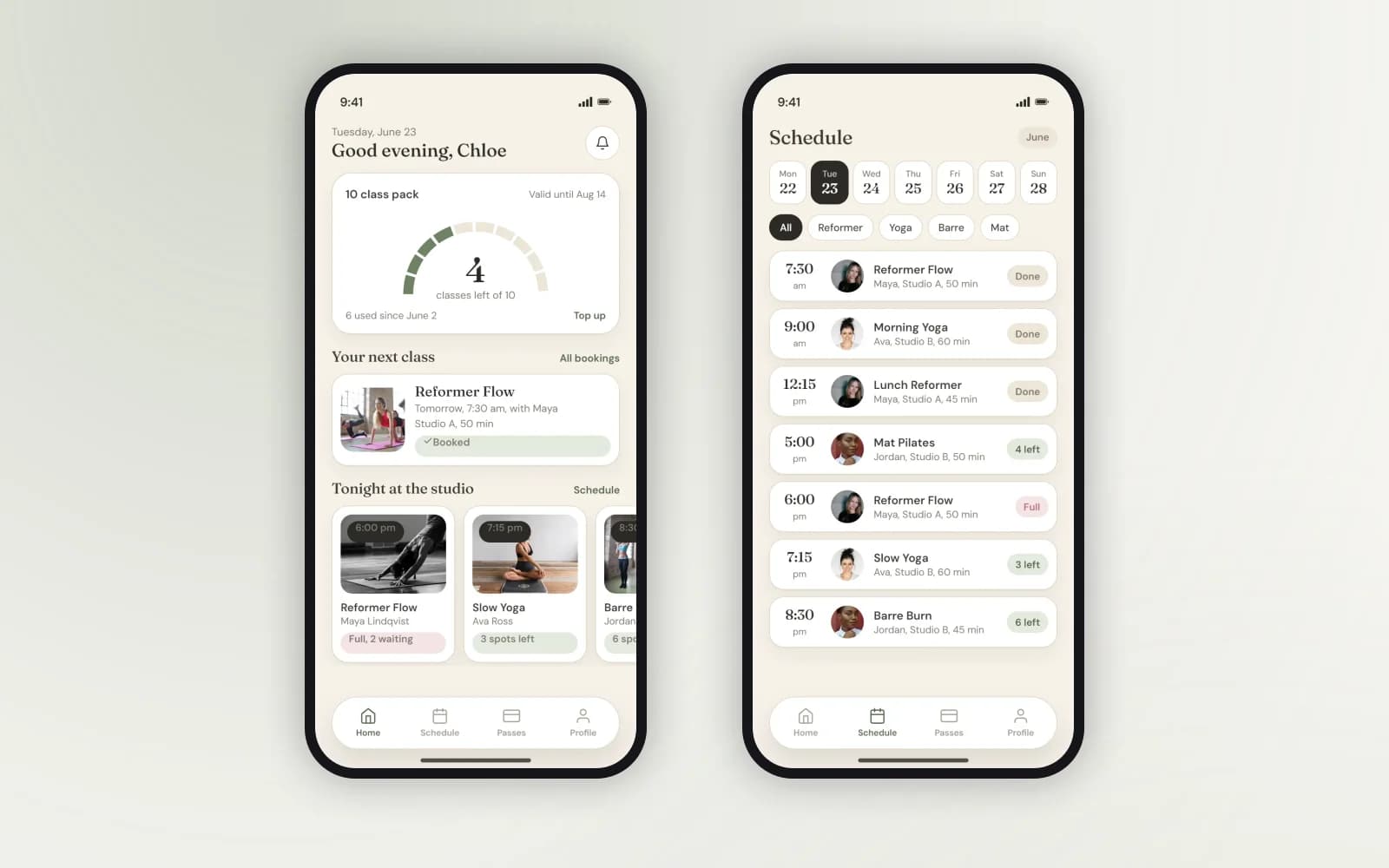
Two projects show booking done the way clients expect. The Northside clinic website turns a visit request into a confirmed slot with a reminder and gives the front desk one screen for the day. The Form Lune studio app fills a cancelled spot from the waiting list with a fifteen-minute push.
The stack we build with.
Fair questions, straight answers.
Tell us how you book today
Send your services, who provides them, your cancellation rule and the calendar or software you use. We’ll map the booking flow, name the integrations and estimate the work.